Design Your Own X1 SkyRacer
Example machine: X1 SkyRacer, a rule-book-legal, folding two-seater: four 44 in lift ducts with coaxial fan pairs, twin ducted pushers, long-chord wings, and Dornier-style sponsons that carry the propane and the wheels. It stows in the 90 × 216 × 53 in hauler box.
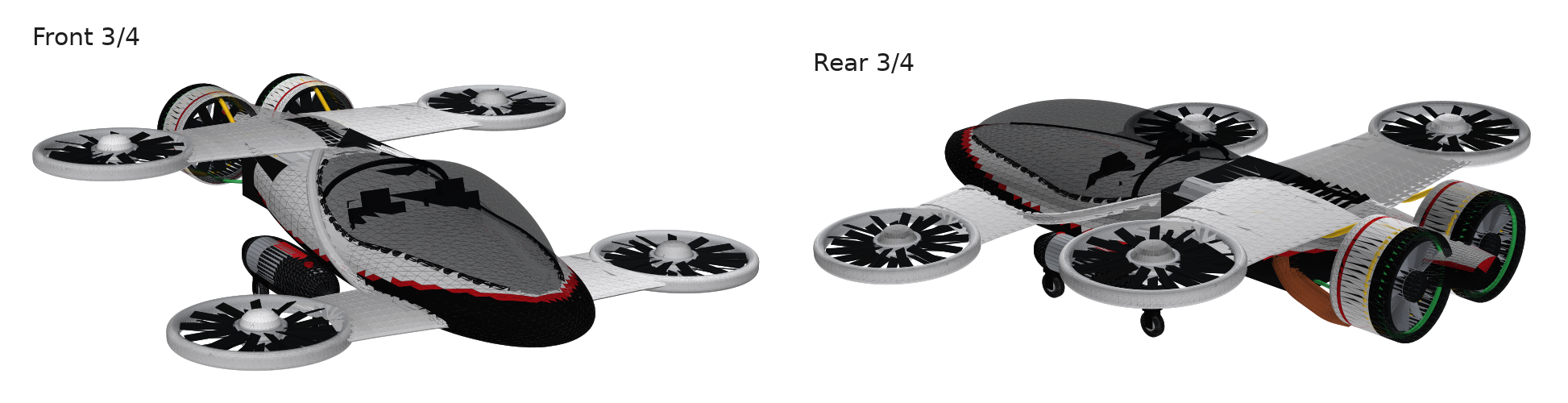
See it in 3D drag to orbit · pinch or scroll to zoom
Key numbers flight · stowed · systems
Packaging
Fuel & energy
- Sponson tanks: 2 × 11.8 in × 48 in capsules, 72 L each, low on the flanks between the stowed ducts.
- Transverse tank behind the firewall: 13.8 in × 46 in, 93 L.
- 7.5 kWh LTO accumulator (162 Toshiba SCiB cells, 373 V) in a case on the belly floor under the generator, fully inside the fuselage.
- Red fuel fillers on top of each sponson.
Cabin & chassis
- Two seats side by side: 55 in at the hips, 45 in at the shoulders.
- About 33 in from seat to canopy crown; recline or lower the seats for helmeted adults. Races run with no one aboard; the front seats carry the 500 lb of ballast (or instrumentation in its place).
- Engine bay for the OPFPLG (opposed free-piston linear generator): about 53 in long × 39 in wide × 18 in tall, above the accumulator.
- 4.5 L OPFPLG outside the bay: the exhaust tailpipe exits under the fuselage ahead of the pushers, and propane vapour lines run to 3D-printed heat exchangers behind each pusher fan, whose stator vanes condense the propane.
- Four 8 in wheels under the sponsons: 68 in track, 42 in wheelbase.
Balance: with the 500 lb of ballast in the front seats, the race CG sits about 9 in ahead of the rear axle, so the craft sits level on its wheels. With the ballast removed it is only about 2 in ahead, so a tail skid is still worth having.
Folding flight → hauler box
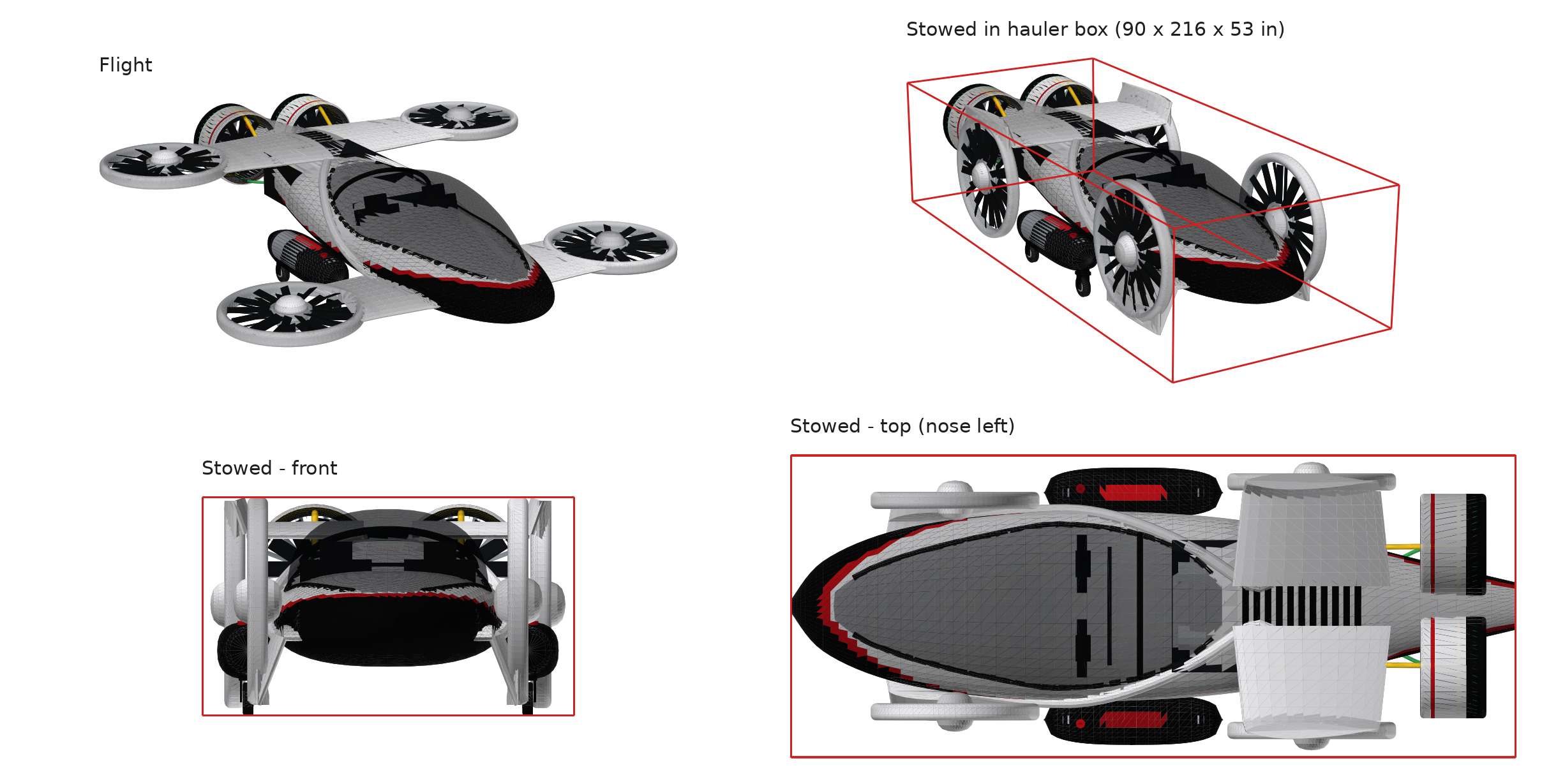
| Station | Wing hinge | Duct hinge | Stowed position |
|---|---|---|---|
| Front | 69° down | 159° | Stands on edge beside the nose, 2.6 in off the ground |
| Rear | 70° up | 160° | Hangs on edge beside the engine bay, top at 52 in |
Rule check measured from the model every run
| Rule | Item | Built | Limit | Status |
|---|---|---|---|---|
| §3.2 | Span, tip to tip | 185.8 in | 186.0 in | OK |
| §3.2 | Length | 215.8 in | 216.0 in | OK |
| §3.2 | Height, flight | 51.2 in | 110.4 in | OK |
| §3.2 | Stowed width | 86.0 in | 90.0 in | OK |
| §3.2 | Stowed height | 52.9 in | 53.0 in | OK |
| §3.2 | Stowed length | 215.8 in | 216.0 in | OK |
| §3.6 | Lift duct inner diameter | 44.0 in | 44.0 in | OK |
| §3.6 | Forward duct inner diameter | 26.0 in | 36.0 in | OK |
| §3.6 | Lift fans (4 locations × coaxial pair) | 8 | 8 | OK |
| §3.6 | Forward-flight fans | 2 | 2 | OK |
| §3.3/3.6 | Propane tank capacity | 238 L | ≥ 223 L | OK |
| §3.3 | Race weight (full propane + full ballast, no pilot) | 3,500 lb | ≤ 3,500 lb | OK |
| §3.3 | Ballast capacity, front seats | 500 lb | ≥ 500 lb | OK |
| §3.4 | Two side-by-side bare-frame seats | 2 | 2 | OK |
What the §3.2 size limits mean in practice: folded, the craft fits inside a 90 in wide × 216 in long × 53 in tall box, sized to fit a standard race-car hauler trailer. Unfolded for flight (span up to 15.5 ft, length up to 18 ft, height up to 9.2 ft), it fits in a standard two-car garage. See it in the X1 SkyRacer Transport Study.
Flight model JSBSim · PX4 · ArduPilot
The X1 SkyRacer also comes with a flight model built from the same geometry, so it can fly in JSBSim and in simulators built on it, such as PteroSim with PX4 or ArduPilot. Each 44 in duct is modelled as one coaxial unit, every fan is limited by the power available, and the OPFPLG burns propane at 60 % thermal efficiency, so the numbers below follow from 1,500 hp continuous and 2,000 hp burst. They are estimates until there's test-stand data.
| File | For | What it is |
|---|---|---|
X1_SkyRacer.xml | JSBSim | Mass and inertia; 8 lift fans as 4 coaxial duct units and 2 pushers, limited by shaft power (1,500 hp continuous, about 1,910 hp burst with the 7.5 kWh LTO accumulator); propane burn at 60 % thermal efficiency; yaw from rotor torque; aero through ±180°; wheels; propane tanks |
x1_skyracer.params | PX4 | Control allocation for 8 coaxial lift rotors + 2 pushers |
x1_skyracer.parm | ArduPilot | QuadPlane, OctaQuad X lift + forward throttle |
glb/ | PteroSim, Unreal, any game engine | One GLB per part, in game-ready colours with nav lights: the exterior body, the 8 lift fans, the 2 pushers and the 4 wheels, each pivoting on its own axis so it can spin or roll. No internal parts |
x1_skyracer_manifest.json | Any sim or game | Rotor index ↔ Blender object ↔ GLB file, spin directions, positions and mount points, mass properties |
x1_pterosim_kit.py | You | Regenerates all of the above from the Blender geometry, no Blender needed; change the assumptions at the top |
Fly it in FlightGear free flight simulator · Windows · Mac · Linux
The X1 SkyRacer is also a ready-to-fly aircraft for FlightGear, the free, open-source flight simulator. It uses the flight model above, with a flight computer that flies it like a drone: there are no control surfaces, so your inputs become thrust on the eight lift fans.
Install
- Download and install FlightGear (2020.3 or newer).
- Download the X1 SkyRacer for FlightGear (.zip) and unzip it.
- Make a folder for add-on aircraft outside the FlightGear install, e.g.
Documents/FlightGear/Aircraft, and move theX1_SkyRacerfolder into it. - Start FlightGear, open the Add-ons tab, and under Additional aircraft folders click Add and pick that folder.
- Go to Aircraft, search for X1 SkyRacer, select it and press Fly! If it doesn't appear, restart FlightGear.
Controls
| Input | Does |
|---|---|
| Throttle (Page Up / Down) | Climb or descend. 45–55 % holds altitude, 75 % climbs ~10 ft/s, 30 % descends ~6 ft/s, under 10 % is ground idle |
| Stick / arrow keys | Bank and pitch, up to 30°. Let go and it levels itself. At speed, bank to turn |
| Rudder (keypad 0 / Enter) | Turn the nose |
[ / ] | Pusher thrust down / up. Full pushers ≈ 155 mph on burst power, ≈ 135 mph once the accumulator's burst energy is used |
| Shift-F | Fold / unfold for the hauler (on the ground, throttle closed) |
| Equipment → Fuel and Payload | Ballast loads full (250 lb per front seat, 500 lb) for race weight. Lower it to fly lighter. The flight computer trims for it |
First flight: throttle to 75 % to lift off, back to 50 % to hover, then tap ] to fly forward. To land, [ back to zero, pitch up a little to slow down, throttle to 30 %, and close it after touchdown. The flight model was tested in JSBSim; tell us how it flies in FlightGear.
Blender model Blender 3.6 / 4.x
The whole craft is generated by one Python script. In Blender, open the Scripting workspace, paste the script into a new text block, and press Run Script. It builds the model in metres, keys a Fold animation (frame 1 flight, frame 60 stowed), and saves a .blend and a .glb to ~/X1_SkyRacer. To include the engine parts that show outside the bay (exhaust, propane lines, pusher heat exchangers), save the OPFPLG engine script x1_opfplg_blender.py into ~/X1_SkyRacer first; without it the craft builds without them.
For simulators, see the flight model above. PteroSim adds custom airframes through PteroLabs: send them the flight model kit and the .glb. To fly it yourself, see Fly it in FlightGear above.
View script source (x1_skyracer_blender.py)
Build your own prompt + image → model + flight model
Start from a picture. Your sketch, an SI (super intelligence) concept or a photo sets the look; the prompt holds your design to the X1 Racing rule book, so it still fits the hauler box and passes the rule check. You get a Blender model and a flight model for it.
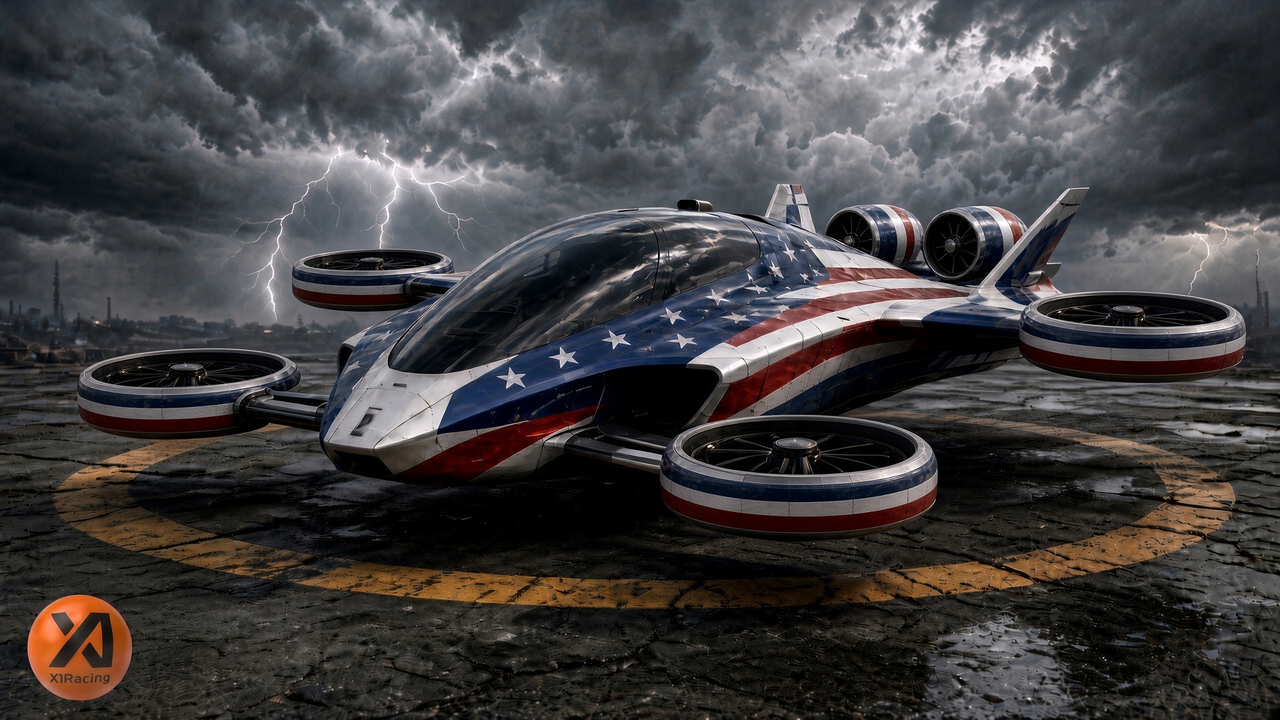
The image sets the look, the rules set the size
- The SI copies the body shape, canopy, proportions and colours from your image.
- Span, length, height, the 44 in lift ducts, the fan count and the hauler box come from the rule book. Where the image breaks a rule, the rules win and the SI tells you what it changed.
- Your script also writes a JSBSim flight model from your own geometry: mass and CG from where your parts sit, your rotor positions, your wheels. Its flight check warns if the CG is outside the duct rectangle or a rotor runs past 80 % just to hover.
- Use original designs only. Logos, wordmarks or characters in your image are left out.
- Want a closer match? Turn your image into a 3D mesh with an image-to-3D tool such as Tripo, import it into Blender as a reference, and have the script model over it. The mesh itself won't fold or pass the rule check.
Open source design on GitHub repo · rule book · share your design
The X1 SkyRacer is open source and built for public input. The latest SkyRacer design, the OPFPLG power plant (opposed free-piston linear generator) and the X1 Racing rule book all live in one public repository on GitHub. Browse it, clone it and build on it. Race. Iterate. Accelerate.
- Share your design. Built one with the prompt above? Open an issue on the repository and tell us what you changed, what the rule check said and where you want help.
- Take on an open problem. Structure, flight model, CFD and flight testing, power plant, controls and SI, race course design: the repository lists what we need.
- Imagineers wanted. No age requirement and no degree needed. With SI (super intelligence) tools, imagination drives the innovation: if you can imagine it, you can help build it.
The repository is public and read-only: anyone can view and clone it, and only invited collaborators change it, so an issue is the way in. You can also reach us through x1racing.com or @realx1racing on X. The official rule book is at x1racing.com/rule-book; if the copy on GitHub ever differs, the website wins.
Updates
- — The X1 SkyRacer design is now open source on GitHub, with the latest design, the OPFPLG power plant and the X1 Racing rule book. Browse it, clone it, and share your design or ideas by opening an issue.
- — Front wings trimmed where they meet the fuselage: the wing roots now stop at the skin instead of running on inside the body. New renders, 3D model, Blender script, flight model kit and FlightGear aircraft.
- — The 4.5 L OPFPLG now shows on the craft: exhaust tailpipe under the fuselage, propane lines to the pushers, and printed heat-exchanger stator vanes behind each pusher fan. New renders, 3D model, Blender script, flight model kit and FlightGear aircraft.
- — Matches the 4.5 L OPFPLG: the accumulator is now the 7.5 kWh LTO pack from the OPFPLG model (burst about 1,910 hp, under the 2,000 hp ceiling), the side intakes are gone, and the emergency landing is on 2 of 3 cylinders plus a parachute. New renders, 3D model, Blender script, flight model kit and FlightGear aircraft.
- — New 3D model and Blender script: the accumulator is now part of the OPFPLG model, so it is no longer a separate part here, and the side intakes are removed.
- — Realistic 190 lb lift units and 100 lb pushers with a 7.9 % mass reduction, so race weight sits at the 3,500 lb recommended max; flight numbers updated to match. Every fan's blades are now pitched for its own spin direction. New renders, 3D model, flight model kit and FlightGear aircraft.
- — Accumulator moved up onto the belly floor under the generator, so it sits fully inside the fuselage instead of hanging below it. New renders, 3D model, Blender script, flight model kit and FlightGear aircraft.
- — Flight model kit now includes GLB parts for PteroSim and game engines: the body, each of the 10 fans and each wheel as its own file, pivoting on its own axis, in game-ready colours with red-tipped fans and nav lights.
- — Renamed X1 SkyRacer to avoid a clash with a road car of a similar name. Same design; every download is renamed to match.
- — The 3D viewer now links its generator script, x1_web_glb.py, which rebuilds the .glb from the Blender script.
- — See the X1 SkyRacer in 3D: orbit, zoom, fold it for the hauler and spin the fans, right under the hero image.
- — Downloads now say X1 Racing throughout. The build-your-own fuel check reports the average power 200 lb can sustain over a full race instead of flagging every design that can't run flat out for 44 min.
- — Flight model now treats each lift duct as one coaxial unit, limits every fan by power (1,500 hp continuous, 2,000 hp burst from the 10 kWh accumulator) and burns propane in the OPFPLG at 60 % thermal efficiency: about 38 min at full power.
- — SI (super intelligence) wording throughout, and a new link-preview image for sharing.
- — Follows the updated rule book §3.3: race weight now includes the full 500 lb of front-seat ballast (3,270 lb, under the 3,500 lb recommended max). Flight model kit, FlightGear aircraft and build-your-own prompt updated.
- — 500 lb ballast capability in the front seats: flight model kit, FlightGear aircraft and the build-your-own prompt.
- — X1 SkyRacer for FlightGear. Fixed the flight model kit so it loads in JSBSim.
- — Flight model kit (JSBSim, PX4, ArduPilot). Build-your-own scripts now write a flight model too.
- — Build your own from an inspiration image.